

Can You See Who Someone Recently Followed on Instagram? A Step-By-Step Guide for 2026
- Category: Pics |
- 26 Oct, 2026 |
- Views: 355 |
We've all been there. You're casually scrolling through Instagram, minding your own business, when curiosity suddenly kicks in.
Who did your friend just follow? Why is that random account suddenly everywhere? And has your favorite influencer discovered a new obsession?
Congratulations. You've officially entered Instagram detective mode.
But before you grab your imaginary magnifying glass, there's a catch.
If you're trying to see who someone recently followed on Instagram, simply opening their Following list won't give you the answers you expect.
Instagram doesn't display another person's follows in chronological order. Fortunately, there are ways to investigate, from free manual checks to tools like Snoopreport.
Here's what actually works in 2026, without turning your evening into a six-hour scrolling marathon.
The Instagram Following List Is Not Your Friend
Let's address the biggest myth first.
You open someone's profile, tap Following, and see a mysterious username at the top.
Your brain immediately goes: "Aha! Their newest follow!"
Not so fast, Sherlock.
Instagram doesn't reliably arrange another person's Following list from newest to oldest. The first account displayed isn't necessarily the most recent addition.
The platform removed its old Following Activity tab in 2019, taking away a feature that previously showed selected interactions from accounts you followed.
Instagram does offer chronological feeds for posts. In its official announcement about the Following feed, Meta explained how users can view recent posts from accounts they follow.
But there's an important difference between seeing someone's latest posts and seeing whom another person recently started following.
They're not the same feature.
So if you think you've cracked the algorithm just by checking the top five usernames, Instagram has some disappointing news for you.
Step 1: Try the Free Instagram Method
Before paying for anything, start with what Instagram already provides.
Open the Profile
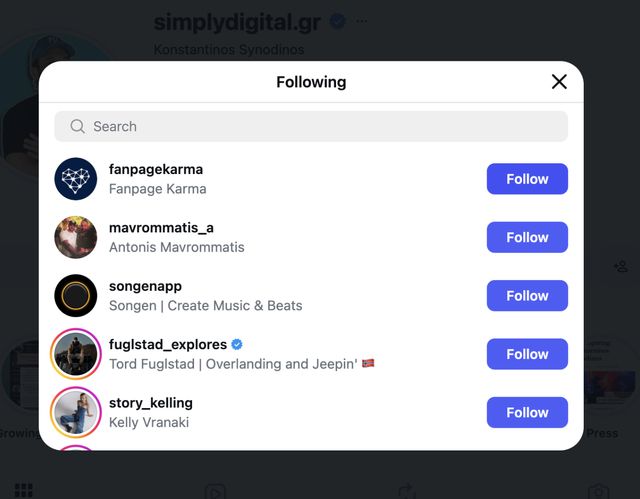
Find the account you're curious about and tap Following.
For public profiles, this generally lets you browse the accounts they follow. Private profiles have additional restrictions.
Search for a Specific Username
If you suspect someone follows a particular person, search for that username within the Following list.
This can answer one simple question: does the connection currently exist?
What it can't reliably tell you is when that connection started.
Take a Screenshot
Here's where things get slightly ridiculous.
You can take screenshots of the visible list, save the date, and repeat the process later.
If new usernames appear, you may have identified changes worth examining.
Technically, it works as a basic comparison method.
Practically, it can become an unpaid internship in Instagram archaeology.
And because the list order may change, spotting an unfamiliar username doesn't automatically prove it's a new follow.
Verdict: Free and useful for checking specific connections, but frustrating if you want a reliable history.
Step 2: Use a Tracker Instead of Becoming a Full-Time Detective
If screenshots aren't your idea of a fun weekend, a dedicated Instagram activity tracker may be worth considering.
Snoopreport is an Instagram activity tracker that monitors likes, follows, and unfollows on public Instagram accounts. The tool then organizes this information into convenient weekly and monthly reports.
Instead of checking the same Following list repeatedly, you enter the username of a public account and let the service record available changes over time.
The platform tracks follows, unfollows, and liked posts, presenting the information in weekly and monthly reports.
Essentially, it handles the repetitive checking while you get back to more important things.
Like watching cat videos.
How Does Snoopreport Work?
The process is straightforward:
1. Enter a username. Choose the public Instagram account you're interested in.
2. Start tracking. Snoopreport begins recording available activity from the day you add the account.
3. Review the reports. Check which accounts were detected as newly followed or unfollowed during each reporting period.
There's no need to provide your Instagram password or connect your personal Instagram account.
The person being tracked isn't notified.
For anyone trying to see who someone recently followed on Instagram over several weeks, these reports offer a more organized alternative to manually comparing screenshots.
Step 3: Understand What the Reports Actually Show
Imagine your favorite content creator suddenly starts following ten photography accounts.
Are they planning a secret photoshoot? Buying a new camera? Entering their artistic era?
Maybe.
Or perhaps they watched one photography Reel and fell down the algorithm rabbit hole.
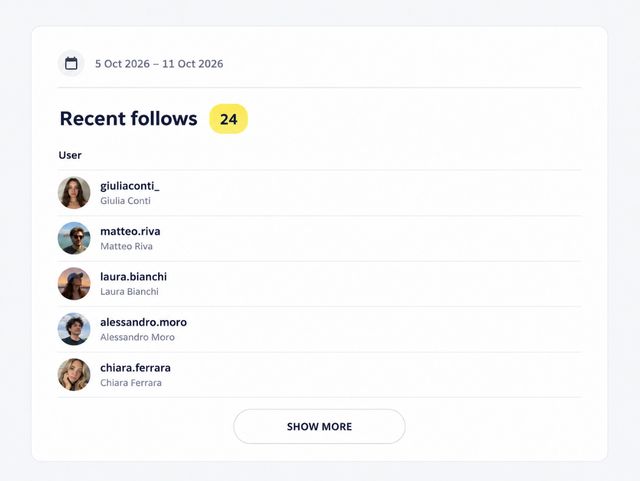
Snoopreport can show detected follows during a particular week or month. It can also reveal available liked posts and identify recurring interests through optional AI summaries.
But there's a crucial limitation.
A report can show that an action happened. It cannot explain the reason.
And the reports don't identify the exact minute someone pressed Follow.
Think of it as a timeline of observed activity, not a magical window into somebody's thoughts.
That distinction matters, especially when people start interpreting Instagram follows like clues in a true-crime documentary.
Step 4: Know What Snoopreport Costs
Snoopreport isn't a free service, although its entry-level pricing is relatively accessible.
Its published plans include:
• Personal: $4.99 per month for 2 tracked accounts.
• Small Business: $14.99 per month for 10 accounts.
• Professional: $44.99 per month for 100 accounts.
Optional AI summaries cost extra, with the Personal plan increasing to $6.99 per month.
There's also an option to purchase available historical reports at $1.19 per account per week.
Subscriptions renew monthly, and unused portions of a canceled billing period aren't refunded.
For someone who checks a single Following list once a year, paying for a tracker probably isn't necessary.
But if you're regularly researching public profiles, creators, or changing online communities, organized reports can save considerable effort.
Step 5: Don't Expect Instagram Superpowers
Now for the reality check.
Snoopreport has limitations, and understanding them is essential before spending money.
First, it only tracks public Instagram accounts. It cannot bypass privacy settings or reveal hidden activity from private profiles.
Second, reports aren't complete records of every action.
The company states that its reports may capture up to 75% of an account's public activity, depending on what Instagram makes observable.
Third, the tool doesn't reveal private messages, story views, or someone's online status.
So no, it won't transform your laptop into the control room of a spy movie.
It simply organizes available public engagement information.
And missing activity doesn't prove that an interaction never happened.
When Is Tracking Recent Follows Actually Useful?
Curiosity is normal. Instagram practically runs on it.
But there are situations where tracking public follow changes has a practical purpose.
Content creators might want to understand which accounts other creators in their niche are discovering.
Brands can observe changing connections between influencers and competitors.
Someone following a public figure may simply be interested in emerging hobbies or collaborations.
Still, context matters.
A person following a fitness coach doesn't prove they're secretly training for a marathon. Following a musician doesn't mean they're joining a band.
And following an unfamiliar person definitely doesn't prove anything about a relationship.
If you're curious about someone's behavior, social media activity can provide context, but it shouldn't replace actual communication.
Final Verdict: Is Snoopreport Worth Trying?
So, can you actually see who someone recently followed on Instagram?
For public accounts, you can identify some changes through repeated manual observations or a dedicated tracking service.
Instagram's built-in features are enough when you only want to check whether a particular connection exists.
But if you're tired of endlessly scrolling, Snoopreport offers a more convenient way to review detected follows and unfollows through weekly and monthly reports.
It's not perfect, and it won't reveal someone's secret intentions.
But it can help turn a messy Following list into a more useful activity timeline.
Just remember: if your goal is to see who someone recently followed on Instagram, the data may answer who and approximately when.
The why is still a mystery.
Even Sherlock Holmes would need to ask.